Tuesday, December 16, 2025

Best Password Manager for Small Business: An Informational Guide

Best Password Manager for Small Business

Introduction

In today’s digital landscape, small businesses face increasing cybersecurity threats, making effective password management a critical component of overall security strategy. With multiple accounts, applications, and services requiring authentication, managing passwords securely and efficiently is essential to protect sensitive data and maintain operational integrity. This guide explores the best password manager for small business needs, focusing on features, types, cost considerations, challenges, and implementation best practices.

Importance of Password Management for Small Businesses

Small businesses often operate with limited IT resources, which can make them vulnerable to cyberattacks such as phishing, credential stuffing, and ransomware. Poor password practices—such as reusing passwords, using weak credentials, or storing passwords insecurely—can lead to unauthorized access and data breaches.

Effective password management helps mitigate these risks by:

  • Ensuring strong, unique passwords for each account
  • Reducing the likelihood of human error in password handling
  • Facilitating secure sharing of passwords among employees
  • Centralizing password storage and access control
  • Supporting compliance with industry regulations and standards

Key Features to Consider in a Password Manager

Security Protocols and Encryption Standards

Security is paramount when selecting a password manager. Look for solutions that use strong encryption algorithms such as AES-256, which is widely recognized as a secure standard for data protection. End-to-end encryption ensures that passwords are encrypted locally on the user's device before being stored or synced, preventing unauthorized access even if the service provider’s servers are compromised.

Additional security measures to consider include zero-knowledge architecture, meaning the provider cannot access your passwords, and regular security audits by independent third parties.

User Access Controls and Permissions

Small businesses often require different levels of access for employees depending on their roles. A suitable password manager should offer granular access controls, allowing administrators to assign permissions such as read-only, edit, or share rights. Role-based access helps maintain security while enabling collaboration.

Audit logs and activity tracking are also valuable for monitoring password usage and identifying potential security incidents.

Integration with Business Tools and Platforms

Integration capabilities enhance productivity by allowing password managers to work seamlessly with existing business software such as identity management systems, single sign-on (SSO) providers, and productivity suites. Compatibility with browsers, mobile devices, and desktop operating systems is also important to ensure smooth user experience.

Ease of Use and User Experience

Adoption of a password manager depends heavily on user experience. Intuitive interfaces, straightforward setup processes, and clear instructions help ensure employees use the tool consistently. Features like password generation, autofill, and secure password sharing simplify daily workflows, reducing friction.

Multi-Device and Cross-Platform Support

Small business employees often use multiple devices, including desktops, laptops, tablets, and smartphones. A password manager that supports synchronization across platforms (Windows, macOS, iOS, Android) enables users to access credentials securely from anywhere, enhancing flexibility and remote work capabilities.

Customer Support and Resources

Reliable customer support is critical, especially for small businesses that may lack dedicated IT staff. Look for providers offering multiple support channels such as email, chat, and phone, along with comprehensive documentation, tutorials, and community forums to assist with troubleshooting and training.

Types of Password Managers Suitable for Small Businesses

Cloud-Based Password Managers

Cloud-based password managers store encrypted data on remote servers managed by the provider. These solutions offer ease of deployment, automatic updates, and accessibility from any internet-connected device. They are typically subscription-based and scalable, making them popular among small businesses with limited IT infrastructure.

Examples of common features include:

  • Centralized administration console
  • Automatic syncing across devices
  • Regular security updates managed by the vendor

On-Premises Password Managers

On-premises solutions store password data on servers located within the business’s own infrastructure. This option provides greater control over data storage and security policies, appealing to businesses with strict compliance requirements or concerns about cloud data residency.

However, on-premises managers generally require more IT resources for installation, maintenance, and updates.

Hybrid Solutions

Hybrid password managers combine elements of cloud and on-premises deployments, offering flexibility for businesses that want to keep sensitive data on-site while leveraging cloud features such as remote access and collaboration. These solutions can be customized to meet specific security and operational needs.

Cost Factors and Pricing Considerations

Subscription Models and Licensing Fees

Most password managers for small businesses operate on a subscription basis, with monthly or annual licensing fees. Pricing often depends on the number of users, storage capacity, and included features. Some providers offer tiered plans that scale with business growth.

Number of Users and Scalability

Cost typically increases with the number of users. It is important to select a password manager that can accommodate current staffing levels and scale as the business expands without requiring disruptive migrations or additional overhead.

Additional Features and Add-Ons

Some password managers offer optional add-ons such as advanced reporting, compliance tools, multi-factor authentication (MFA) integration, or priority support. Businesses should evaluate whether these extras align with their security needs and budget.

Free vs. Paid Versions

While free password managers exist, they often have limitations such as restricted user counts, fewer security features, or lack of business-focused administration tools. Paid versions typically provide enhanced security, user management, and customer support, which are important for professional environments.

Common Challenges and Limitations of Password Managers

Despite their benefits, password managers have some challenges:

  • Master Password Dependency: Losing the master password can result in loss of access to all stored credentials if no recovery options are available.
  • User Adoption: Employees may resist changing established habits or find the software cumbersome without proper training.
  • Compatibility Issues: Some password managers may not integrate well with legacy systems or niche applications.
  • Security Risks: If the password manager itself is compromised, attackers could gain access to multiple accounts, though strong encryption and zero-knowledge policies mitigate this risk.

Best Practices for Implementing a Password Manager in a Small Business

  • Conduct a Needs Assessment: Identify the number of users, types of accounts, and security requirements before selecting a solution.
  • Choose a Reputable Provider: Select a password manager with strong security protocols, positive reviews, and transparent policies.
  • Develop a Password Policy: Establish guidelines for password complexity, update frequency, and sharing protocols.
  • Train Employees: Provide clear instructions and ongoing support to encourage consistent use and reduce errors.
  • Implement Multi-Factor Authentication: Enhance security by requiring additional verification methods alongside passwords.
  • Regularly Review Access and Logs: Monitor usage to detect unauthorized activity and adjust permissions as needed.
  • Backup and Recovery Planning: Ensure master passwords and recovery options are securely stored and accessible to authorized personnel.

Frequently Asked Questions

What is a password manager and how does it work?

A password manager is a software application that securely stores and manages passwords for various accounts. It encrypts passwords and allows users to retrieve them easily, often through a master password. Many password managers also generate strong passwords and autofill login credentials.

Are password managers secure for business use?

When chosen carefully, password managers are secure tools that use strong encryption and security protocols to protect passwords. They reduce risks associated with weak or reused passwords and help enforce security policies. However, security depends on proper implementation and user practices.

Can a password manager integrate with existing business software?

Many password managers offer integrations with popular business tools such as single sign-on (SSO) providers, identity and access management (IAM) systems, and productivity suites. Compatibility varies by vendor, so it is important to verify integration capabilities before selection.

How many users can a small business password manager support?

Small business password managers typically support from a handful to several hundred users, depending on the product and pricing tier. Scalability is an important consideration to accommodate future growth without service disruption.

What should I do if I forget the master password?

Master password recovery options vary by provider. Some password managers offer recovery keys, biometric access, or customer support assistance. Others operate with zero-knowledge encryption and cannot reset the master password, emphasizing the need to store it securely.

Are there compliance considerations when using password managers?

Yes, businesses in regulated industries may need to ensure that their password management practices comply with standards such as HIPAA, PCI DSS, or GDPR. Choosing a password manager that supports compliance features like audit logging and access controls is advisable.

How often should passwords be updated in a password manager?

Best practices recommend updating passwords periodically, especially for critical accounts or when a breach is suspected. Password managers can facilitate regular updates by generating strong new passwords and alerting users to weak or reused credentials.

Can password managers help with multi-factor authentication?

Many password managers support or integrate with multi-factor authentication (MFA), adding an extra layer of security beyond just passwords. Some include built-in MFA token generators, while others integrate with third-party MFA apps or hardware tokens.

Is it necessary to train employees on password manager usage?

Training is important to ensure that employees understand how to use the password manager effectively and securely. Proper training reduces resistance, prevents mistakes, and maximizes the security benefits of the tool.

What are the risks of not using a password manager in a small business?

Without a password manager, small businesses risk weak or reused passwords, increased susceptibility to phishing and hacking, difficulty in managing access, and potential data breaches. This can lead to operational disruptions, reputational damage, and regulatory penalties.

Sources and references

This article is informed by a range of authoritative sources including cybersecurity industry reports, government cybersecurity guidance, IT vendor documentation, and insights from business technology analysts. Relevant information has been drawn from:

  • Government agencies such as the Cybersecurity and Infrastructure Security Agency (CISA)
  • Industry standards organizations and compliance frameworks
  • Technology research firms and cybersecurity consultancies
  • Vendor whitepapers and product documentation
  • Small business technology advisory groups

Cyber Liability Insurance Coverage for Small Business

What Is Cyber Liability Insurance?

Definition and Purpose

Cyber liability insurance is a specialized form of insurance designed to protect businesses from financial losses related to cyber incidents. These incidents can include data breaches, cyberattacks, and other technology-related risks that compromise sensitive information or disrupt business operations.

The primary purpose of cyber liability insurance is to provide coverage for costs associated with managing and recovering from cyber events. This can include expenses such as legal fees, notification costs, data recovery, and business interruption losses.

Importance for Small Businesses

Small businesses often lack the extensive cybersecurity resources of larger enterprises, making them attractive targets for cybercriminals. Despite their size, small businesses can hold valuable customer data, intellectual property, and financial information, all of which are vulnerable to cyber threats.

Cyber liability insurance helps small businesses manage the financial risks associated with cyber incidents, offering a safety net that can mitigate the impact of such events on their operations and reputation.

Common Cyber Risks Faced by Small Businesses

Data Breaches and Hacking

Data breaches occur when unauthorized individuals gain access to sensitive information such as customer data, payment details, or proprietary business information. Small businesses may be targeted due to weaker security defenses. Hackers can exploit vulnerabilities in software, networks, or employee practices to infiltrate systems.

Phishing and Social Engineering Attacks

Phishing attacks involve deceptive communications, often emails, that trick employees into revealing credentials or clicking malicious links. Social engineering manipulates human behavior to gain unauthorized access. These attacks can lead to compromised accounts and unauthorized data access.

Ransomware and Malware

Ransomware is a type of malware that encrypts a business’s data, rendering it inaccessible until a ransom is paid. Malware can also include spyware, viruses, and trojans that disrupt operations or steal information. Small businesses may lack adequate defenses, making them vulnerable to these threats.

Insider Threats

Insider threats arise from employees, contractors, or partners who intentionally or unintentionally cause harm to the business’s information systems. This can include data theft, accidental data leaks, or misuse of access privileges.

What Does Cyber Liability Insurance Typically Cover?

Data Breach Response and Notification Costs

Coverage often includes expenses related to managing a data breach, such as forensic investigations to determine the scope of the breach, notifying affected customers or clients as required by law, and providing credit monitoring services to mitigate identity theft risks.

Legal and Regulatory Expenses

Cyber liability insurance may cover legal fees associated with defending against lawsuits or regulatory actions stemming from a cyber incident. This includes costs related to compliance with data protection laws such as the California Consumer Privacy Act (CCPA) or the Health Insurance Portability and Accountability Act (HIPAA).

Business Interruption Losses

If a cyber event disrupts normal business operations, resulting in lost income, coverage may include compensation for these losses. This helps small businesses maintain financial stability during recovery periods.

Cyber Extortion and Ransom Payments

Some policies cover ransom payments demanded by cybercriminals during ransomware attacks, as well as costs related to negotiating with extortionists or hiring specialists to manage the situation.

Third-Party Liability Claims

Cyber incidents can affect customers, vendors, or partners. Cyber liability insurance may cover claims made by third parties alleging that the business’s negligence led to a data breach or other cyber harm.

What Is Generally Excluded from Coverage?

Intentional Acts and Fraud

Policies typically exclude coverage for losses resulting from intentional wrongdoing or fraudulent acts by the insured or its employees.

Physical Damage

Cyber liability insurance usually does not cover physical damage to hardware or property caused by cyber incidents. Separate property or equipment insurance would address these losses.

Pre-existing Vulnerabilities

Incidents arising from vulnerabilities known before the policy inception date are often excluded. Businesses are expected to disclose relevant information during underwriting.

Unencrypted Data

Some insurers exclude coverage for breaches involving unencrypted sensitive data, emphasizing the importance of maintaining strong data protection practices.

How to Determine If Your Small Business Needs Cyber Liability Insurance

Assessing Your Cyber Risk Exposure

Start by evaluating the types and volumes of data your business handles, including customer information, financial records, and intellectual property. Consider how critical your digital systems are to daily operations and the potential financial impact of a cyber incident.

Industry-Specific Considerations

Certain industries, such as healthcare, finance, or retail, face heightened regulatory requirements and cyber risks. Small businesses in these sectors may have greater need for cyber liability insurance due to increased exposure and compliance obligations.

Regulatory and Compliance Requirements

Some states and industries mandate specific cybersecurity standards or breach notification requirements. Cyber liability insurance can assist in managing compliance-related costs and legal risks.

Cost Factors for Cyber Liability Insurance

Business Size and Revenue

Larger businesses with higher revenues typically pay more for coverage due to increased risk exposure and potential claim sizes. Small businesses with modest revenues may find policies more affordable but should still consider adequate coverage limits.

Type and Volume of Data Handled

Businesses that store sensitive personal information, payment card data, or health records may face higher premiums because of the greater consequences of a breach.

Security Measures and Risk Management Practices

Insurers often assess the strength of a business’s cybersecurity controls, such as firewalls, encryption, employee training, and incident response plans. Strong security practices can lead to lower premiums and better coverage terms.

Claims History

A history of previous cyber claims or incidents can increase premiums or affect insurability. Conversely, a clean claims record may improve underwriting outcomes.

Coverage Limits and Deductibles

Higher coverage limits and lower deductibles generally result in higher premiums. Small businesses should balance their risk tolerance with budget constraints when selecting policy limits.

How to Choose a Cyber Liability Insurance Policy

Evaluating Coverage Options

Review the specific coverages offered, including response costs, liability protection, business interruption, and extortion coverage. Understand any sublimits or caps on certain coverages.

Understanding Policy Terms and Conditions

Carefully examine exclusions, definitions, and conditions that may affect claims. Pay attention to notification requirements, claim reporting timelines, and any requirements for maintaining security controls.

Working with Insurance Providers and Brokers

Consulting with experienced insurance brokers or agents can help small businesses navigate policy options and tailor coverage to their unique needs. Brokers can also assist with risk assessments and claims processes.

Steps to Take After a Cyber Incident

Immediate Actions and Containment

Upon discovering a cyber incident, businesses should act quickly to contain the breach, secure systems, and prevent further damage. This may involve isolating affected devices, changing passwords, and engaging cybersecurity experts.

Reporting and Notification Requirements

Many states require businesses to notify affected individuals and regulatory authorities following a data breach. Understanding these obligations and adhering to timelines is critical to compliance and minimizing penalties.

Working with Insurers and Legal Counsel

Notify your cyber liability insurer promptly to initiate claims processes and access covered services such as forensic investigations and legal support. Legal counsel can help navigate regulatory inquiries and potential litigation.

Frequently Asked Questions (FAQ)

  • What is the difference between cyber liability insurance and general liability insurance?
    Cyber liability insurance specifically covers risks related to data breaches and cyber incidents, whereas general liability insurance addresses bodily injury, property damage, and other traditional business risks not related to cyber events.
  • Does cyber liability insurance cover ransomware attacks?
    Many cyber liability policies include coverage for ransomware-related expenses such as ransom payments, negotiation costs, and system restoration. Coverage specifics vary by policy.
  • How much does cyber liability insurance cost for a small business?
    Costs vary widely based on business size, industry, data sensitivity, and security measures. Premiums for small businesses can range from several hundred to several thousand dollars annually.
  • Are small businesses really at risk of cyber attacks?
    Yes. Small businesses are increasingly targeted due to often weaker security defenses and valuable data. Cyberattacks can lead to significant operational and financial harm.
  • Can cyber liability insurance help with regulatory fines?
    Some policies cover fines and penalties arising from regulatory actions related to data breaches, but coverage depends on jurisdiction and policy terms.
  • What information do insurers require to provide a quote?
    Insurers typically ask about business size, industry, types of data handled, cybersecurity measures, past claims, and coverage needs.
  • How quickly can coverage be activated?
    Coverage activation times vary; some insurers offer immediate or next-day coverage, while others may require underwriting review before issuance.
  • Does cyber liability insurance cover employee mistakes?
    Many policies provide coverage for incidents caused by employee errors such as accidental data exposure, though intentional acts are excluded.
  • What steps can reduce my cyber insurance premiums?
    Implementing strong cybersecurity practices, conducting employee training, maintaining up-to-date software, and having an incident response plan can help lower premiums.
  • Is cyber liability insurance mandatory for small businesses?
    Cyber liability insurance is generally not legally required but may be strongly recommended or contractually required by clients or partners.

Sources and References

Information for this article was compiled from a variety of sources including insurance providers specializing in cyber coverage, cybersecurity vendors offering risk assessment tools, government agencies providing regulatory guidance such as the Federal Trade Commission (FTC), and industry associations focused on small business security best practices. These sources offer insights into policy structures, cyber risk trends, and compliance considerations relevant to U.S.-based small businesses.

Monday, December 15, 2025

Workers Compensation Insurance Cost North Carolina

Introduction to Workers Compensation Insurance in North Carolina

Workers compensation insurance is a critical component of workplace safety and employee protection in North Carolina. It provides coverage for medical expenses and lost wages for employees who sustain work-related injuries or illnesses. For employers, this insurance is not only a safeguard for their workforce but also a legal requirement in most cases. Understanding the workers compensation insurance cost in North Carolina is essential for business owners and managers to budget appropriately and ensure compliance with state regulations.

This article explores the factors influencing workers compensation insurance costs in North Carolina, how premiums are calculated, and practical insights into managing these expenses. It also covers state-specific requirements and addresses frequently asked questions to provide a comprehensive resource for businesses operating in North Carolina.

Overview of Workers Compensation Insurance Costs

Workers compensation insurance costs vary widely depending on several factors, including the nature of the business, the number of employees, and the risk associated with the job roles. In North Carolina, the cost is typically expressed as a rate per $100 of payroll. This rate is influenced by the classification of the work performed, historical claims data, and regulatory frameworks.

On average, businesses might expect to pay between $0.75 and $2.50 per $100 of payroll, but this range can be broader depending on the industry and risk level. High-risk industries such as construction or manufacturing often face higher rates compared to lower-risk sectors like clerical or retail.

Factors Influencing Workers Compensation Insurance Cost in North Carolina

Industry and Job Classification

The type of industry and specific job classifications play a significant role in determining workers compensation insurance costs. The North Carolina Industrial Commission assigns classification codes based on the type of work employees perform. Each classification has an associated rate reflecting the risk level.

  • High-risk classifications: Jobs involving physical labor, heavy machinery, or hazardous environments typically have higher rates.
  • Low-risk classifications: Office work, administrative roles, and similar positions generally have lower rates.

For example, a roofing company will likely pay a higher premium than a software development firm due to the increased risk of injury.

Payroll Size and Employee Count

Workers compensation premiums are calculated based on the total payroll subject to coverage. Larger payrolls result in higher overall premiums, though the rate per $100 of payroll may remain consistent. Employers with many employees must carefully track payroll to ensure accurate premium calculations.

It’s important to note that some insurers may offer discounts or tiered rates for larger businesses, but the fundamental cost driver remains the payroll size.

Claims History and Experience Modification Rate (EMR)

A business’s claims history directly impacts its workers compensation insurance cost through the Experience Modification Rate (EMR). The EMR is a multiplier applied to the base premium to reflect the employer’s past claims experience relative to similar businesses.

  • EMR < 1.0: Indicates better-than-average claims history, potentially lowering premiums.
  • EMR = 1.0: Reflects average claims experience.
  • EMR > 1.0: Suggests higher-than-average claims, increasing premiums.

Businesses with frequent or severe claims may face significantly higher costs due to an elevated EMR.

State-Specific Regulations and Requirements

North Carolina has specific laws governing workers compensation insurance, including mandatory coverage requirements for most employers. These regulations influence cost structures and insurance availability.

  • Employers with three or more employees (including part-time) are generally required to carry workers compensation insurance.
  • Certain industries or occupations may have additional requirements or exemptions.
  • The North Carolina Industrial Commission oversees claims and compliance, which can affect insurer risk assessments and pricing.

Understanding these regulations helps businesses ensure compliance and anticipate potential cost implications.

Type and Level of Coverage

The scope of coverage selected also affects workers compensation insurance cost. While standard policies cover medical treatment and wage replacement, businesses may opt for additional coverage options or endorsements, such as:

  • Coverage for specific occupational diseases
  • Voluntary compensation for exempt employees
  • Increased limits or extended benefits

Enhanced coverage options increase premiums but can provide greater protection tailored to business needs.

How Workers Compensation Insurance Premiums Are Calculated in North Carolina

Premium calculation for workers compensation insurance in North Carolina involves several steps:

  • Classification of employees: Assigning correct classification codes based on job duties.
  • Calculation of payroll: Determining the total payroll for each classification.
  • Application of base rates: Using the assigned rates per $100 of payroll for each classification.
  • Adjustment by EMR: Multiplying the base premium by the employer’s experience modification rate.
  • Application of any discounts or surcharges: Based on insurer policies or state assessments.

For example, a business with $500,000 in payroll classified under a rate of $1.50 per $100 of payroll and an EMR of 1.1 would calculate the premium as follows:

Base premium = ($500,000 / 100) × $1.50 = $7,500

Adjusted premium = $7,500 × 1.1 = $8,250

This example illustrates how payroll, classification, and claims history combine to determine the final premium.

Average Workers Compensation Insurance Costs by Industry in North Carolina

Workers compensation insurance costs vary significantly by industry due to differing risk profiles. Approximate average rates per $100 of payroll for common industries in North Carolina include:

  • Construction: $2.00 - $4.00
  • Manufacturing: $1.50 - $3.00
  • Retail: $0.75 - $1.50
  • Healthcare: $1.50 - $3.00
  • Office/Clerical: $0.30 - $0.75

These ranges reflect typical risk exposures and can vary based on company size, claims history, and other factors. For instance, a small retail store with minimal physical labor will generally pay less than a large manufacturing plant with heavy machinery.

Methods to Manage and Potentially Reduce Workers Compensation Insurance Costs

While some factors affecting workers compensation insurance cost are fixed, businesses can adopt strategies to manage and potentially reduce premiums:

  • Implementing workplace safety programs: Reducing accidents lowers claim frequency and severity.
  • Regular employee training: Educating workers on best practices and hazard awareness.
  • Prompt claims reporting and management: Efficient handling of claims can reduce costs and improve outcomes.
  • Reviewing employee classifications: Ensuring accurate job classification avoids overpayment.
  • Increasing deductibles or self-insurance: For larger businesses, assuming more risk can lower premiums.
  • Shopping among insurers: Comparing quotes and coverage options to find competitive pricing.

These approaches contribute to safer workplaces and more predictable insurance costs over time.

North Carolina Workers Compensation Insurance Requirements for Employers

Employers in North Carolina must comply with specific workers compensation insurance requirements, including:

  • Mandatory coverage: Businesses with three or more employees must carry workers compensation insurance.
  • Coverage for part-time and seasonal workers: These employees count toward the employee threshold.
  • Proof of insurance: Employers must provide certificates of insurance upon request and display notices in the workplace.
  • Penalties for non-compliance: Employers without coverage risk fines, legal action, and liability for employee claims.

Understanding these obligations helps businesses avoid costly penalties and ensures protection for employees.

Common Challenges in Estimating Workers Compensation Insurance Costs

Estimating workers compensation insurance costs can be complex due to several challenges:

  • Variable payroll amounts: Fluctuations in employee hours or seasonal hiring affect premium calculations.
  • Classification nuances: Misclassifying employees can lead to inaccurate premiums or audits.
  • Changing claim histories: Recent claims may not be fully reflected in the EMR, causing unexpected premium changes.
  • Regulatory updates: Changes in state laws or rate filings can alter costs annually.
  • Differences among insurers: Rates and underwriting criteria vary, complicating comparisons.

Employers should work closely with insurance professionals and regularly review coverage to maintain accurate cost projections.

Frequently Asked Questions About Workers Compensation Insurance Cost in North Carolina

What is the average cost of workers compensation insurance in North Carolina?

The average cost varies widely by industry and risk but generally ranges from $0.75 to $2.50 per $100 of payroll. High-risk industries may pay more, while low-risk businesses pay less.

How does my business’s industry affect workers compensation insurance rates?

Industries with higher physical risks, such as construction or manufacturing, have higher rates due to greater injury likelihood. Office-based or clerical jobs typically have lower rates.

Are there minimum coverage requirements for workers compensation insurance in North Carolina?

Yes, most employers with three or more employees are required by law to carry workers compensation insurance. Coverage must meet state standards for medical and wage benefits.

How can a poor claims history impact my insurance premiums?

A poor claims history increases the Experience Modification Rate (EMR), which raises premiums. Frequent or severe claims signal higher risk to insurers, resulting in higher costs.

Can I shop around for workers compensation insurance in North Carolina?

Yes, businesses can obtain quotes from multiple insurers to compare rates and coverage options. This practice helps find competitive pricing and suitable policy terms.

What role does payroll size play in determining insurance cost?

Payroll size is a primary factor since premiums are calculated based on payroll amounts. Larger payrolls lead to higher total premiums, though rates per $100 of payroll may stay consistent.

How often do workers compensation insurance rates change in North Carolina?

Rates can change annually based on filings by the North Carolina Rate Bureau, industry trends, and claims data. Employers should review rates each policy renewal.

Are there penalties for not carrying workers compensation insurance in North Carolina?

Yes, employers without required coverage may face fines, stop-work orders, and liability for claims costs. Compliance is mandatory to avoid these penalties.

How can safety programs influence workers compensation insurance costs?

Effective safety programs reduce workplace injuries, lowering claim frequency and severity. This improvement can lead to a better EMR and reduced premiums over time.

What resources are available to help understand workers compensation insurance pricing in North Carolina?

Employers can consult the North Carolina Industrial Commission, insurance brokers, industry associations, and the North Carolina Rate Bureau for guidance on insurance pricing and regulations.

Sources and references

This article is informed by a range of sources including:

  • State government agencies such as the North Carolina Industrial Commission and Department of Insurance, which provide regulatory guidance and statistical data.
  • Insurance carriers and brokers specializing in workers compensation, offering insights into underwriting criteria and premium calculation methodologies.
  • Industry associations that publish benchmarking data and best practices for workplace safety and insurance management.
  • Independent research firms and vendors that analyze claims data and market trends to inform cost estimates.

Sunday, December 14, 2025

General Liability Insurance Cost for Small Business

What Is General Liability Insurance?

Definition and Purpose

General liability insurance is a fundamental type of business insurance designed to protect small businesses from financial losses related to third-party claims. These claims often involve bodily injury, property damage, or personal and advertising injury caused by the business operations, products, or services.

The primary purpose of general liability insurance is to cover legal fees, settlements, and judgments that may arise if a business is sued. It helps safeguard the company’s assets and continuity by mitigating risks associated with everyday business activities.

Coverage Overview

Typical general liability insurance policies cover a range of incidents, including but not limited to:

  • Bodily injury to customers or visitors on the business premises
  • Property damage caused by the business or its employees
  • Personal and advertising injury, such as libel, slander, or copyright infringement
  • Medical payments for injuries occurring on-site regardless of fault
  • Legal defense costs in covered claims

It is important to note that this insurance generally does not cover employee injuries (which are covered by workers’ compensation) or professional errors (covered by professional liability insurance).

Why Small Businesses Need General Liability Insurance

Small businesses face numerous risks daily, including accidents, property damage, and allegations of negligence. General liability insurance provides a financial safety net for these risks, which can otherwise lead to significant out-of-pocket expenses or even business closure.

Even businesses operating primarily online or from home may require general liability coverage due to potential claims involving customers or third parties. For example, a retail store owner may be held liable if a customer slips and falls on their premises, while a contractor might face claims arising from property damage during a project.

Having general liability insurance can also enhance credibility and trust with clients and partners, who may require proof of coverage before engaging in business.

Average Cost of General Liability Insurance for Small Businesses in the US

National Average Premiums

In the United States, the average cost of general liability insurance for small businesses typically ranges from $400 to $1,500 annually, depending on various factors. This translates to roughly $30 to $125 per month for many small enterprises.

For very small businesses or sole proprietors with minimal risk exposure, premiums can be closer to the lower end of this range. Meanwhile, businesses with higher risk profiles or larger operations may pay more.

Cost Range by Business Size and Industry

The cost of general liability insurance varies widely based on industry and size. Some examples include:

  • Retail businesses: Often pay between $500 and $1,000 annually due to customer foot traffic and property exposure.
  • Construction contractors: Typically face higher premiums, ranging from $1,000 to $3,000 or more, reflecting increased risk of injury and property damage.
  • Consultants and professional services: May have lower costs, sometimes under $500 annually, as their risk of bodily injury or property damage is limited.
  • Restaurants: Can expect premiums from $1,000 to $2,500 annually due to food-related risks and customer interactions.

Business size, measured by number of employees or annual revenue, also impacts cost. Larger businesses with more employees or higher revenue generally pay higher premiums because of increased exposure.

Factors Affecting General Liability Insurance Cost

Business Location

Geographic location influences insurance costs due to differences in legal environments, local regulations, and risk factors. For example, businesses operating in urban areas with higher crime rates or frequent lawsuits may face higher premiums.

State-specific insurance regulations and the local cost of claims also play a role. For instance, liability claims in states like California or New York may result in higher premiums than in states with fewer claims or lower legal costs.

Industry and Risk Level

Insurance providers assess risk based on the nature of the business activities. Industries with higher risks of injury or property damage naturally incur higher premiums. For example:

  • Construction and manufacturing industries typically have higher costs due to physical hazards.
  • Professional services such as consulting or accounting generally have lower premiums because of reduced physical risk.
  • Businesses involving food service, child care, or transportation may also face elevated premiums due to increased liability exposure.

Business Size and Revenue

Insurance premiums often scale with the size of the business. Key size indicators include:

  • Number of employees
  • Annual gross revenue
  • Physical size of business premises

Larger businesses or those with higher revenues typically pay more because they have greater exposure to claims.

Coverage Limits and Deductibles

The amount of coverage selected directly affects the premium. Common coverage limits for general liability insurance include:

  • $1 million per occurrence
  • $2 million aggregate (total coverage for the policy term)

Higher limits increase premiums because the insurer assumes more risk. Conversely, choosing a higher deductible, which is the amount the business pays out of pocket before insurance applies, can reduce premium costs.

Claims History

Businesses with a history of liability claims may face higher premiums. Insurers view prior claims as indicators of increased future risk, leading to adjustments in pricing or coverage terms.

Conversely, a clean claims history can help secure more favorable rates.

Additional Endorsements or Coverage Options

Adding endorsements or riders to a general liability policy can increase costs. Examples include:

  • Product liability coverage for businesses manufacturing or selling products
  • Contractual liability coverage for specific contracts
  • Liquor liability for businesses serving alcohol

These specialized coverages address specific risks but also raise premiums accordingly.

How to Estimate Your Small Business General Liability Insurance Cost

Estimating the cost of general liability insurance involves gathering detailed information about your business and requesting quotes from multiple insurers. Key steps include:

  • Identifying your industry and business activities
  • Determining your desired coverage limits and deductible amounts
  • Providing details on business size, revenue, and location
  • Disclosing any prior claims or losses

Many insurers and brokers offer online tools or questionnaires to help estimate costs based on these factors. Comparing multiple quotes can provide a clearer picture of the market rate for your specific business profile.

Ways to Potentially Lower Your General Liability Insurance Premium

Small businesses can explore several strategies to manage and possibly reduce their general liability insurance costs, including:

  • Improving risk management: Implementing safety protocols, employee training, and regular inspections to reduce accidents and claims.
  • Increasing deductibles: Opting for a higher deductible can lower premium costs but requires readiness to cover more out-of-pocket expenses.
  • Bundling policies: Combining general liability insurance with other policies like commercial property or business owner’s policies may yield discounts.
  • Maintaining a clean claims history: Minimizing claims can help keep premiums stable or lower over time.
  • Shopping around: Comparing multiple insurers and negotiating can uncover more competitive rates.
  • Tailoring coverage: Avoiding unnecessary coverage or endorsements that do not fit your business needs can reduce costs.

Common Misconceptions About General Liability Insurance Costs

There are several misconceptions about general liability insurance costs among small business owners, including:

  • “It’s too expensive for small businesses.” While costs vary, many small businesses can obtain affordable coverage tailored to their risk level.
  • “I don’t need it if I’m a home-based business.” Even home-based businesses may face liability risks requiring coverage.
  • “My business is low risk, so I don’t need insurance.”strong> Unexpected incidents can occur in any business, making insurance a prudent safeguard.
  • “Higher coverage limits are unnecessary.”strong> While higher limits increase premiums, they provide greater protection against costly claims.
  • “Claims history doesn’t affect premiums.”strong> Past claims often influence future premiums and underwriting decisions.

Frequently Asked Questions (FAQ)

1. What is the typical cost of general liability insurance for a small business?

The average annual cost ranges from $400 to $1,500, depending on factors such as industry, business size, location, and coverage limits.

2. How does my industry affect my insurance premium?

Industries with higher risks of injury or property damage, like construction or food service, generally pay higher premiums than lower-risk sectors such as consulting or retail.

3. Can I reduce my insurance costs by increasing my deductible?

Yes, selecting a higher deductible usually lowers your premium, but it means you will pay more out-of-pocket when filing a claim.

4. Does having prior claims impact my insurance rates?

Yes, insurers consider your claims history when setting premiums. Multiple or recent claims can lead to higher costs or difficulty obtaining coverage.

5. How often should I review or update my general liability coverage?

It is advisable to review your coverage annually or whenever your business undergoes significant changes, such as expansion, new services, or increased revenue.

6. Are there any discounts available for small business insurance?

Discounts may be available for bundling policies, maintaining a claims-free history, implementing safety programs, or membership in certain professional organizations.

7. Is general liability insurance required by law for small businesses?

General liability insurance is not mandated by federal law, but some states, industries, or contracts may require it. It is often required by landlords or clients.

8. How do coverage limits influence the cost of insurance?

Higher coverage limits increase premiums because they raise the insurer’s potential payout. Choosing appropriate limits balances protection and cost.

9. Can I bundle general liability insurance with other policies to save money?

Yes, many insurers offer multi-policy discounts when you bundle general liability with other business insurance like property or commercial auto insurance.

10. What documentation do insurers typically require to provide a quote?

Insurers usually request business details such as industry classification, revenue, number of employees, prior claims history, and desired coverage limits to provide accurate quotes.

Sources and references

This article is based on information compiled from various types of sources including:

  • Insurance carriers and underwriters specializing in small business coverage
  • Industry reports and market analyses from insurance vendors
  • Guidance and regulatory information from government agencies such as state insurance departments
  • Expert commentary and educational resources on business risk management and insurance

Best Cloud Backup for Small Business: An Informational Guide

Understanding Cloud Backup for Small Businesses

What is Cloud Backup?

Cloud backup refers to the process of copying and storing data on remote servers accessed via the internet. Unlike traditional on-premises backups, cloud backup solutions allow businesses to securely save their data offsite, ensuring availability and protection against local disasters or hardware failures.

Importance of Cloud Backup for Small Businesses

Small businesses often operate with limited IT resources, making data loss a significant risk. Cloud backup offers a practical way to safeguard critical business information such as customer records, financial data, and operational files. It supports business continuity by enabling quick recovery from data loss incidents, minimizing downtime and potential revenue impact.

Key Features of Cloud Backup Solutions

  • Automated backups: Scheduled backups reduce manual effort and ensure consistent data protection.
  • Data encryption: Protects data during transfer and storage to maintain confidentiality.
  • Scalability: Ability to adjust storage capacity as business data grows.
  • Recovery options: Various restore methods to meet different recovery needs.
  • Compatibility: Support for multiple platforms and file types commonly used by small businesses.

Types of Cloud Backup Services

Public Cloud Backup

Public cloud backup services utilize shared infrastructure managed by third-party providers. They offer cost-effective solutions due to resource pooling and are accessible over the internet. Examples include popular cloud platforms that provide backup as part of their service portfolio.

Private Cloud Backup

Private cloud backup involves dedicated infrastructure for a single organization, either hosted internally or by a third party. This approach offers enhanced control and security, which may be preferable for businesses with strict data privacy requirements.

Hybrid Cloud Backup

Hybrid cloud backup combines public and private cloud environments, allowing businesses to balance cost, performance, and security. Critical or sensitive data might be stored in a private cloud, while less sensitive information is backed up to the public cloud.

Essential Criteria for Choosing Cloud Backup

Data Security and Encryption

Security is a primary concern when selecting cloud backup. Look for solutions that provide end-to-end encryption, both in transit and at rest. Additionally, features such as multi-factor authentication and compliance with industry security standards enhance data protection.

Backup Frequency and Automation

Backup frequency determines how often data is saved. Automated backup scheduling helps maintain up-to-date copies without manual intervention. Options range from continuous data protection to daily or weekly backups depending on business needs.

Storage Capacity and Scalability

Assess current data volumes and anticipated growth to select a backup service that can scale accordingly. Flexible storage plans prevent overpaying for unused capacity and accommodate expanding data requirements.

Recovery Options and Speed

Recovery capabilities vary among providers. Check for options such as full system restores, file-level recovery, and point-in-time restores. Recovery speed is critical for minimizing downtime, so consider providers with fast data retrieval mechanisms.

Compliance and Legal Considerations

Small businesses handling regulated data should ensure their backup provider complies with relevant standards such as HIPAA, GDPR, or PCI DSS. Compliance helps meet legal obligations and protects customer information.

Overview of Common Cloud Backup Providers for Small Business

Provider Types and Service Models

Cloud backup providers offer various service models, including:

  • Software as a Service (SaaS): Backup software accessed via subscription without hardware requirements.
  • Infrastructure as a Service (IaaS): Cloud storage infrastructure that businesses can configure for backup purposes.
  • Managed Backup Services: Providers handle backup management, monitoring, and recovery on behalf of the business.

Typical Service Offerings and Limitations

Most providers offer features like incremental backups, compression, and versioning. However, limitations may include data transfer caps, limited retention periods, or lack of support for certain file types. Understanding these constraints helps in selecting a suitable solution.

Pricing Considerations for Cloud Backup

Pricing Models (Subscription, Pay-as-you-go)

Cloud backup pricing typically follows subscription models or pay-as-you-go plans. Subscription plans often include a fixed storage amount and features for a monthly or annual fee. Pay-as-you-go charges are based on actual storage used and data transferred.

Factors Affecting Cost (Storage, Data Transfer, Features)

  • Storage volume: Larger data sets increase monthly fees.
  • Data transfer: Upload and download activities may incur additional costs.
  • Advanced features: Encryption, multi-user support, and priority recovery can influence pricing.

Budgeting for Long-Term Backup Needs

Consider future data growth and potential price changes when budgeting. Selecting a provider with transparent pricing and flexible plans can help manage costs over time.

Integration and Compatibility

Compatibility with Business Software and Systems

Ensure the cloud backup solution supports the operating systems, applications, and file types used by the business. Integration with productivity suites, databases, and accounting software can streamline backup processes.

Mobile and Remote Access Capabilities

Access to backup management and data restoration via mobile devices or remote connections is beneficial for businesses with distributed teams or remote work arrangements.

Managing and Monitoring Cloud Backup

Backup Scheduling and Management Tools

Effective management tools allow businesses to customize backup schedules, prioritize critical data, and automate routine tasks. User-friendly dashboards can simplify administration for small IT teams.

Reporting and Alert Features

Regular reports and real-time alerts help monitor backup status, identify failures, and ensure compliance with backup policies. These features support proactive management and timely issue resolution.

Potential Challenges and Limitations

Internet Dependency and Bandwidth Issues

Cloud backup requires reliable internet connectivity. Limited bandwidth or outages can delay backups and recovery processes, impacting business operations.

Data Transfer Speeds and Recovery Times

Large data volumes may result in slow initial backups and extended recovery times. Incremental backups and data deduplication can mitigate these effects but may not eliminate them entirely.

Vendor Lock-in and Data Portability

Moving data between providers can be complex due to proprietary formats or transfer costs. Evaluating data portability options before committing to a provider can reduce future migration challenges.

Frequently Asked Questions (FAQ)

1. What is the difference between cloud backup and cloud storage?

Cloud backup focuses on creating copies of data for recovery purposes, often including versioning and automated schedules. Cloud storage is a broader term for storing files online, which may not include backup-specific features.

2. How secure is cloud backup for sensitive business data?

Cloud backup can be secure when providers implement strong encryption, access controls, and comply with industry standards. Businesses should verify these security measures before selecting a service.

3. Can cloud backup solutions handle large volumes of data?

Many cloud backup providers offer scalable storage that accommodates large data volumes. However, initial backups may take longer, and costs can increase with data size.

4. What happens if my cloud backup provider goes out of business?

Data accessibility depends on the provider’s policies and infrastructure. It is advisable to maintain copies of critical data and understand exit strategies to minimize risk.

5. How often should small businesses back up their data?

Backup frequency depends on data change rates and business tolerance for data loss. Many small businesses opt for daily backups, while others may require more frequent or continuous backups.

6. Are there any compliance standards cloud backup services should meet?

Compliance requirements vary by industry and jurisdiction. Common standards include HIPAA for healthcare, GDPR for data protection in the EU, and PCI DSS for payment data. Providers should demonstrate adherence to relevant regulations.

7. How do I restore data from a cloud backup?

Restoration processes vary but typically involve accessing the backup portal, selecting the needed files or system states, and initiating the recovery. Some services offer options for full system restores or selective file recovery.

8. What is the average cost of cloud backup for a small business?

Costs vary widely based on storage needs, features, and providers. Pricing can range from a few dollars per month for minimal storage to higher amounts for extensive data and advanced features.

9. Can cloud backup protect against ransomware attacks?

Cloud backup can aid in recovery from ransomware by providing clean copies of data. However, it does not prevent attacks; businesses should combine backups with other security measures.

10. Is it necessary to have an offsite backup in addition to cloud backup?

Cloud backup itself is an offsite solution. Some businesses maintain additional offsite backups, such as physical drives stored securely, for redundancy and faster recovery options.

Sources and references

This article draws on information from a variety of sources including:

  • Technology vendors specializing in cloud backup and storage solutions
  • Industry reports and analyses from IT research firms
  • Guidance and compliance frameworks from government agencies and regulatory bodies
  • Best practice recommendations from cybersecurity organizations and business continuity experts
  • Feedback and case studies from small business users and IT professionals

AI Skills


Wednesday, December 10, 2025

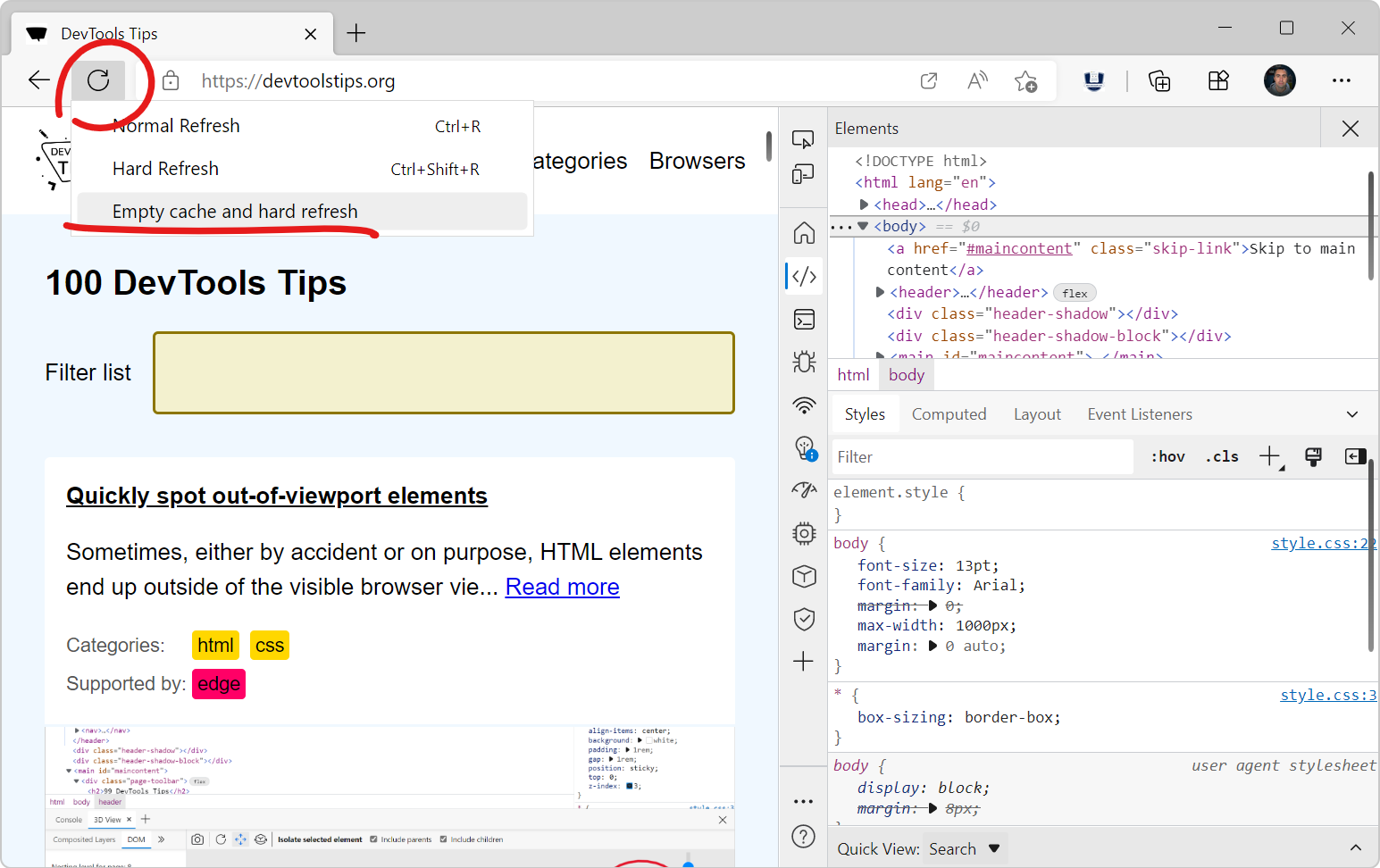
Chrome reload types with Developers tools Ctrl + Shift + I explained... Curious can others access the following?

Here’s the clear, simple difference between the three refresh types in Chrome DevToolsSoft Reload, Hard Reload, and Empty Cache & Hard Reload — and when to use each one.


🔄 Chrome Reload Types Explained

Image


Image


When you open Chrome DevTools (F12) and right-click the refresh icon, you get these options:


1. Soft Reload

What it does:

  • Reloads the page using the cached files when possible.

  • Only updates resources the browser thinks have changed.

  • Fastest reload type.

Useful when:

  • You’re debugging frontend logic.

  • You didn’t change CSS/JS filenames.

  • You want speed over freshness.

Does NOT:

  • Clear cache

  • Force re-download of all files


🔥 2. Hard Reload

What it does:

  • Forces the browser to bypass cache for the main HTML document.

  • Reloads the page and downloads resources again, but may still use some cached subresources (like images or fonts).

Useful when:

  • You changed CSS or JS files but did not change file names.

  • You want to ensure the browser fetches updated versions.

Does NOT:

  • Completely clear the cache—just skips using it for that load.


🚨 3. Empty Cache & Hard Reload (DevTools open required)

What it does:

  • Clears the entire browser cache for that site

  • Forces a full redownload of every resource

    • HTML

    • JavaScript

    • CSS

    • Images

    • Fonts

    • Service worker scripts (unless deeply cached)

This is the most powerful refresh.

Useful when:

  • Website changes aren’t showing at all

  • Service workers or aggressive caching are interfering

  • You're testing deployment changes

  • You need to guarantee a 100% clean load

Important:
Cache is cleared only while DevTools is open; otherwise, Chrome will cache things normally again.


🧠 Summary Table

Action Uses Cache? Clears Cache? When to Use
Soft Reload Yes No Normal browsing; minor script changes
Hard Reload Mostly no No When changes aren't showing but caching isn’t too aggressive
Empty Cache & Hard Reload No Yes When the site refuses to update; deployment testing; debugging cache issues

💡 Bonus Tip: Disable Cache Completely

In DevTools → Network tab → “Disable cache”
Works only while DevTools is open, prevents any caching.


If you want, I can also explain:

  • How service workers affect refresh

  • Why sometimes even Hard Reload doesn’t pull updates

  • How to force Chrome to forget PWA/manifest configs

Just let me know!

Monday, September 15, 2025

Best Git command for reviewing logs

 IMHO the best cmd line in git is the following:

git --no-pager log --oneline

Saturday, September 06, 2025

TDS Telecom - will not contact me to let me know this is a mistake on their part.

 🚨 TDS Telecom in the wrong, Friends, I need your HELP 🚨


All of you, please help me get a response from TDS Telecom Service – TDS Telecommunications LLC. 🙏

I’ve been nothing but kind, but I cannot get a fair response. Please take a moment to stand with the little guy vs the big CORP.

👉 Read my letter here:
https://docs.google.com/document/d/1QFdLDOZ4NFrgiZor1oVyudlJwTBiW0nvMSvwOTf_2vQ/edit?usp=sharing
...

👉 Be sure to click the recording from TDS Customer Service at the bottom.

Your feedback means the world to me. Please help this go viral by clicking, sharing, and spreading the word. I have tried to remain KIND — and IMHO, I am right.

Thank you for standing with me. ❤️

Wednesday, August 20, 2025

Python Functional Programming - Boot.dev

Python Functional Programming


Functional programming is back in vogue. There's a reason front-end frameworks like React and Vue are moving toward functional programming, and after this course you'll more than understand its benefits. We'll dive in-depth into all of the foundational concepts of functional programming in a familiar language.

Tuesday, August 19, 2025

Boot.dev does it again with awesome training. Just completed Kubernetes course aka K8s.

Learn Kubernetes

Kubernetes is the most popular container orchestrator (read: Docker Deployer) in the world. Deploy real services on a local cluster.

What will you learn?

Learn the fundamentals of the most popular container orchestrator in the world: Kubernetes. You'll get your hands dirty and deploy Kubernetes applications, pods, services and even ingress. This isn't just a tutorial, you'll set up real systems, but we'll also cover the theory, concepts and use cases of the technology.


Monday, August 11, 2025

💼 From Code to Capital: Why I’m Now Studying Money Like I Studied Software

Early in my career, I was deep into PC World, Dr. Dobb’s Journal, and CODE Magazine—learning everything I could about computers and software engineering. My father and his best friend kept telling me: “Read Money magazine too.” I didn’t back then.

Now, with retirement on the horizon, I’m taking that advice seriously. Just like I mastered tech through books, newsletters, and YouTube, I’m diving into financial strategy with the same intensity.

One standout? Varo’s savings account offering 4.5% APY—one of the highest returns available this August.

🔗 Explore Varo’s high-yield savings here

If you’re optimizing for the future like I am, it’s time to study money like you studied your craft.

Saturday, June 07, 2025

Tuesday, June 03, 2025

Boot.dev Learn SQL

 What can I say, but how awesome Boot.dev is!!!  I just finished their Learn SQL course and although I have been working with databases for 25 years Boots just help solidified my skills and polished them.  I wish I would have took the course one day earlier because one of my recent interview questions was:

How to you limit the results from a read query.   Answer:  limit <integer> at the end of the query.

Example:

SELECT * FROM USERS limit 50;  -- MySQL, PostgreSQL, SQLite

SELECT TOP(50) * FROM USERS;  -- MSSQL

SELECT * FROM USERS FETCH FIRST 50 ROWS ONLY; -- ORACLE

Very good theory training on increasing database speed by way of normalization and indexes.


Friday, May 23, 2025

What is Encapsulation

What is Encapsulation in Object Oriented Programming?

It is the practice of hiding complexity inside a black box so that it is easier to focu on the problem at hand.


Could you please tell me more about Encapsulation in Object-Oriented Programming?

From my current understanding, it's the practice of concealing the intricate details within a self-contained unit, allowing for a clearer focus on the task at hand.

Wednesday, May 21, 2025

Windows 11 WSL 2 with Linux

Adding to my blog the command once you have WSL 2 running in Windows to connect to https://github.com

gh auth login

This will prompt you to go to https://github.com/ and enter the code provided in the WSL Linux Terminal

Saturday, September 21, 2024

Faucent Extenter by Spurtar

 Bought this product off Amazon and installed today.  Awesome purchase - https://amzn.to/3TCPss9 (Amazon Associate Ad)

Faucet Extender, Spurtar 1080° + 360° Rotatable Multifunctional Extension Faucet, Universal Splash Filter Faucet, Faucet Extender for Bathroom Sink, Swivel Kitchen Faucet Aerator, Black, (HHW0001BK)


Sunday, April 14, 2024

Master Saturday

Enjoyed watching Tiger yesterday with my Dad.  That's right headed back to Ole Eastside Charlotte.  Four Seasons aka Farm Pond Lane.  I then went and had my first visit at "Steamers" Sports Pub just a few miles from my Dad's house.  I was extremely impressed with the number of TV's, Dart boards, and Pool Tables.  And the food was fantastic.  After lunch I headed home and watched from the comfort at home.
 

Saturday, April 13, 2024

Scott's Lawn Triple Action

Well, yesterday was the day after a week of good rain.  Got up early in the morning and opened up my bag of "Scotts - Turf Builder - Triple Action".  Now only time will tell.  I will post photos of the results in a week or so.


Saturday, April 06, 2024

Before Scott's Lawn Care

R.I.P. Tripp and yard work

I miss you Tripp.  Starting to blog through email today as a journal.  Mowed and trimmed the yard for upcoming week rain showers to begin the journey of my Papa's green thumb.  After the rain I am going to spread Scotts turf builder and weed control and report later on the results.

Friday, December 29, 2023

Merry Christmas and Happy New Year

Wishing everyone had a great Christmas and an upcoming Happy New Year.  Next year will begin my goal of creating B2C and B2B services at least one domain a year till I can retire.  Also selling a lot more on different platforms to clean our house up of things not longer used.

Sunday, September 24, 2023

Best Cold Pack and Hot Pack for the money

 On June 15th I had surgery to repair a torn quadriceps tendon from a fall on June 3rd.  The best cold pack and hot pack I have used is the 

MEDVICE 2 Reusable Hot and Cold Ice Packs for Injuries, Joint Pain, Muscle Soreness and Body Inflammation Reusable Gel Wraps Adjustable & Flexible for Knees, Back, Shoulders, Arms and Legs, 2 Count - Pick them up at Amazon - https://amzn.to/3PRTR9t #ad.


Wednesday, September 06, 2023

ARE YOU READY FOR SOME FOOTBALL?

NFL 2023 Game Day Gear

My Teenage 17 Year Old Daughter is Happy, thank you TP-Link Deco https://amzn.to/3P7bSyX!!!


TP-Link Deco WiFi 6 Mesh WiFi System(Deco X20) - Covers up to 4000 Sq.Ft. , Replaces Wireless Internet Routers and Extenders, 2-Pack - https://amzn.to/3P7bSyX 

is a very nice product. With a little time and patience the setup went smooth. First thing unplugged power from my incoming fiber modem then unplugged my Netgear Nighthawk R7000 https://amzn.to/3Z60qbc.  Still going for $89.00 (held resale value nicely) that we have had for 10 years. I then hooked up two ethernet cables for my 1 of 2 Deco(s) named "Office". With two ethernet ports on the back I inserted one line to the modem and another to a switch - https://amzn.to/3Z4pi32 in my office to power my NAS - https://amzn.to/3Pc3MoL, docking station, and other ethernet supported technologies. Right away after setting up our Deco Login and Password by way of the application down loaded to my phone I plugged in "Office" deco right next to my cable modem on the far end of the house because that is where the entry point of the fiber comes into our home.  At first I placed the “Office” Deco directly in front of the modem and BAM! The download was 300Mbps and the upload was 30Mbps.  


Now it was time for the ultimate test.  With excitement I plugged in the second TP-Link Deco named “Hall” right on the opposite side of the home upstairs in front of our daughter’s bedroom and across the hall from our bedroom.  After plugging it in I waited and waited.  The Deco app was not finding the second X20 :(- What to do?  I read the instructions and read to not have the deco next to any electronics so I moved the “Office” deco up to the top of my desk where the NightHawk was before.  I then went upstairs and like magic MESH Wifi 6 was active. YEAH!!!  The last part was simply rebooting my NAS - https://amzn.to/3Pc3MoL to grab a new IP address and reconnect all our devices.  Everybody is happy, especially Dad because no more unplugging the modem than the router, waiting for a minute and plugging the cable modem and then the router back in.  Date 9/6/2023.  I will return and update after a month to provide an update. #ad


Thursday, July 27, 2023

BASH - VIM - Commit message on Windows 11

 To write a git commit, start by typing git commit on your Terminal or Command Prompt which brings up a Vim interface for entering the commit message.

  1. Type the subject of your commit on the first line. ...
  2. Write a detailed description of what happened in the committed change. ...
  3. Press Esc and then type :wq to save and exit.

Sunday, July 16, 2023

Blog Comeback

Been a long time since blogging mostly because security in business does not allow access to blogger, which is a good thing.  Over my 20+ years of software development I have seen security to get it right.  This prevents proprietary code details from being posted.  

However, now I am coming back to write up my new adventure with Java, Spring Boot, React and various databases such as mongo or mysql.  Also, on new tool sets such as JetBrains IntelliJ and Visual Studio Code.  


Monday, July 10, 2023

Google AdSense help to increase revenue

 Dear Visitor's, please click on an ad or two to help with creating residual income from Google.  I would even be grateful to know if the Ads are tailored to your searches to ensure the Google Adsense are showing Ads related to your personal preference.  Please add comments below.

Monday, January 16, 2023

Terraform for Beginners: An Informational Guide for US Business Owners

Terraform for Beginners Introduction to Terraform What is Terraform? Terraform is an open-source infrastructure as code (IaC) tool ...