Robocopy command can be used to move data from one folder to another.
example:
Go to cmd
Robocopy "C:\\SourceDir" "C:\\DestDir" \/E // adding escapes to see if sitemap.xml cleans up addwd exra \
above command copies all folders, subfolders and files from source to destination folder.
Happy Learning!
Read more about this here:
https://social.technet.microsoft.com/wiki/contents/articles/1073.robocopy-and-a-few-examples.aspx
MIR option. It can intelligently mirror source and destination, copying ONLY changed files and deleting files on the destination that are no longer on the source. Very useful when you need to maintain a backup|standby system. rsync is the unix equivalent to this command. I used rsync at home just yesterday. Great stuff!
Monday, January 07, 2019


Azure Cost Learning from Experience after Free Trial Expires
Well, today I logged into my Bank account and I have I nice debit of "MSFT AZURE", although I thought I was very careful to turn off all the Apps/Slots I would not be charged.

https://azure.microsoft.com/en-us/pricing/details/app-service/windows/
Another lesson by experience, I was wrong if you have a Plan aka S1 you will be charged even if you do not have one service running.

https://azure.microsoft.com/en-us/pricing/details/app-service/windows/
Another lesson by experience, I was wrong if you have a Plan aka S1 you will be charged even if you do not have one service running.
Set-AzureRmAppServicePlan -ResourceGroupName $rg -Name $AppServicePlan -Tier FreeWednesday, December 19, 2018
Microsoft Word Navigation Pane (Keep It Open - TOC)
To get to the Microsoft Word Navigation click ctrl+f then select navigation pane and leave it open while working on a very long document. It will help you from pulling out your hair.
Friday, November 02, 2018
JavaScript Execution
1) Global Memory
2) Global Execution
3) Call Stack
Tatoo it on my arm. Be a JavaScript Master mind --- JavaScript is Single Threaded.
function myFunc(){
Console.write("Hello Moojjoo Blogger");
}
That function will never run unless it is called. It is stored in the Global Memory, but will never execute unless you call
myFunc();
Aka
Functions, Executions, Contexts and Call Stack... Know that and JavaScript will be easy for you.
Monday, October 08, 2018
How to delete or clear authentication, cache, and cookies
Instead of trying to hunt down cookies to delete or clear cache for images, authentication, etc. etc. Simply use a Chrome Incognito or Edge new private window. Brand new fresh clean browser window.
Tuesday, October 02, 2018
.NET Core 500 Exception how to see your errors
If you are developing using .Net Core be sure to set the final Configure to the following and be sure to use your keyboard short cut alt+enter to bring in the missing using namespaces for
your references needed.
public void Configure(IApplicationBuilder app, IHostingEnvironment env, ILoggerFactory loggerFactory)
{
env.EnvironmentName = EnvironmentName.Development;
if (env.IsDevelopment())
{
app.UseDeveloperExceptionPage();
}
else
{
app.UseExceptionHandler("/error");
}
app.UseStatusCodePages();
// Enable middleware to serve generated Swagger as a JSON endpoint.
app.UseSwagger();
// Enable middleware to serve swagger-ui (HTML, JS, CSS, etc.),
// specifying the Swagger JSON endpoint.
app.UseSwaggerUI(c =>
{
c.SwaggerEndpoint("/swagger/v1/swagger.json", "My API V1");
c.RoutePrefix = string.Empty;
});
app.UseMvc();
}
}
Tuesday, July 17, 2018
Windows 7 cannot delete folder
I ran into an issue from an import for Favorites and I could not delete the folder. The following YouTube Video helped me resolve the problem. https://www.youtube.com/watch?v=GPpsT37ija0
Wednesday, May 23, 2018
ID4014: A SecurityTokenHandler is not registered to read security token error
Getting the following error (Figure 1):
Server Error in '/' Application.
ID4014: A SecurityTokenHandler is not registered to read security token ('Assertion', 'urn:oasis:names:tc:SAML:2.0:assertion').
Description: An unhandled exception occurred during the execution of the current web request. Please review the stack trace for more information about the error and where it originated in the code.Exception Details: System.IdentityModel.Tokens.SecurityTokenException: ID4014: A SecurityTokenHandler is not registered to read security token ('Assertion', 'urn:oasis:names:tc:SAML:2.0:assertion').
Source Error:
An unhandled exception was generated during the execution of the current web request. Information regarding the origin and location of the exception can be identified using the exception stack trace below. |
Stack Trace:
|
Version Information: Microsoft .NET Framework Version:4.0.30319; ASP.NET Version:4.7.2623.0
Figure 1
Here are some facts:
Azure Active Directory ID (Figure 2):

Figure 2
Application “PNG Projects” Object ID (Figure 3)

Figure 3
Again, trying to convert from SAML 2.0 to SAML 1.1 because SharePoint 2013 and 2016 only accept SAML 1.1.

I have the reply populated in Azure AD as https://projects-dev02-extranet.domain.com/_trust/default.aspx

I have the reply populated in Azure AD as https://projects-dev02-extranet.domain.com/_trust/default.aspx
Friday, May 18, 2018
AADSTS70001: Application with identifier
Getting the following error (Figure 1):

Figure 1
Here are some facts:
Azure Active Directory ID (Figure 2):
Figure 2
Application “PNG Projects” Object ID (Figure 3)
Figure 3
SAML Sign-In Information (Figure 4):

Figure 4
PowerShell with SharePoint Snap-In Showing the Token installed (Figure 5)
Installed RAW Certificate PS C:\Windows\system32> Get-SPTrustedRootAuthority "AzureAD"
Get-SPTrustedIdentityTokenIssuer "AzureAD"
Certificate : [Subject]
CN=Microsoft Azure Federated SSO Certificate
[Issuer]
CN=Microsoft Azure Federated SSO Certificate
[Serial Number]
316201B4157F75B444B5876DD1EF36E0
[Not Before]
5/16/2018 5:13:24 PM
[Not After]
5/16/2021 5:13:24 PM
[Thumbprint]
38B1DA740F7D2C8EAD5E95F6F16B9D8XXXXXXXXXXXX
Name : AzureAD
TypeName : Microsoft.SharePoint.Administration.SPTrustedRootAuthority
DisplayName : AzureAD
Id : 1f6fa3f9-a67e-4827-bd49-ca5c14e74849
Status : Online
Parent : SPTrustedRootAuthorityManager
Version : 12719405
Properties : {}
Farm : SPFarm Name=SP_Config
UpgradedPersistedProperties : {}
ProviderSignOutUri :
DefaultProviderRealm : urn:sharepoint:projects-dev02.domain.com
ProviderRealms : {}
ClaimTypes : {http://schemas.xmlsoap.org/ws/2005/05/identity/claims/name, http://schemas.xmlsoap.org/ws/2005/05/identity/claims/givenname, http://schemas.xmlsoap.org/ws/2005/05/identity/claims/surname}
HasClaimTypeInformation : True
ClaimTypeInformation : {name, GivenName, SurName}
ClaimProviderName :
UseWReplyParameter : False
UseWHomeRealmParameter : False
GroupClaimType :
RegisteredIssuerName :
IdentityClaimTypeInformation : Microsoft.SharePoint.Administration.Claims.SPTrustedClaimTypeInformation
Description : SharePoint secured by Azure AD
SigningCertificate : [Subject]
CN=Microsoft Azure Federated SSO Certificate
[Issuer]
CN=Microsoft Azure Federated SSO Certificate
[Serial Number]
316201B4157F75B444B5876DD1EF36E0
[Not Before]
5/16/2018 5:13:24 PM
[Not After]
5/16/2021 5:13:24 PM
[Thumbprint]
38B1DA740F7D2C8EAD5E95F6F16B9D8E7D5FB5EB
AdditionalSigningCertificates : {}
MetadataEndPoint :
IsAutomaticallyUpdated : False
Name : AzureAD
TypeName : Microsoft.SharePoint.Administration.Claims.SPTrustedLoginProvider
DisplayName : AzureAD
Id : 742ae843-6936-4b30-bdae-1321d3907486
Status : Online
Parent : SPSecurityTokenServiceManager Name=SecurityTokenServiceManager
Version : 12719408
Properties : {}
Farm : SPFarm Name=SP_Config
UpgradedPersistedProperties : {}
Figure 5
Again, trying to convert from SAML 2.0 to SAML 1.1 because SharePoint 2013 and 2016 only accept SAML 1.1.
Thus back to the issue with the first (Figure 1), This is the correct AppID how come I can getting a failure?
Friday, May 04, 2018
PowerShell 5.0
I have been having lots of trouble with using PowerShell with Azure. In order to get it running I finally came across the following site for the correct downloads: https://docs.microsoft.com/en-us/powershell/wmf/5.0/requirements
Tuesday, April 17, 2018
IIS Restart to read registry settings
Using NET STOP and NET START commands to force IIS services to re-read the registry

We strongly recommend that all users upgrade to Microsoft Internet Information Services (IIS) version 7.0 running on Microsoft Windows Server 2008. IIS 7.0 significantly increases Web infrastructure security. For more information about IIS security-related topics, visit the following Microsoft Web site:
For more information about IIS 7.0, visit the following Microsoft Web site:
Summary
When you make changes to the registry that affect IIS and its dependent services, you must stop and restart those services in order to force them to re-read the registry.
As an alternative to stopping and starting those services using the Services applet in Control Panel, you can use the NET STOP and NET START commands.
As an alternative to stopping and starting those services using the Services applet in Control Panel, you can use the NET STOP and NET START commands.
More Information
Stopping IISADMIN and its dependent services
To stop all IIS-related services, type NET STOP IISADMIN /Y at a command prompt. This will stop the IIS Admin Service and all dependent services. Below is an example of the output you will see after issuing this command (the dependent services listed on your computer may vary):The following services are dependent on the IIS Admin Service service. Stopping the IIS Admin Service service will also stop these services. FTP Publishing Service Microsoft NNTP Service Microsoft SMTP Service World Wide Web Publishing Service
Starting the IIS-related services
Use the NET START command to restart the IIS-related services you use. For example, to restart the World Wide Web service, type NET START W3SVC.Determining service names
To determine the service names, start Registry Editor (type Regedit.exe or Regedt32.exe) and go to the following registry key:
HKEY_LOCAL_MACHINE\SYSTEM\CurrentControlSet\Services
Under Services, the service name that works with the NET STOP and NET START commands is listed. NOTE: For each service, there is also a DisplayName value, which is the name listed in the Services applet in Control Panel and in the messages displayed after the NET STOP and NET START commands are run. However, these Display Names cannot be used as a parameter with the NET STOP and NET START commands.
Common IIS-related services
| Service Name | Display Name |
|---|---|
| Iisadmin | IIS Admin Service |
| Msftpsvc | FTP Publishing Service |
| Nntpsvc | Microsoft NNTP Service |
| Smtpsvc | Microsoft SMTP Service |
| W3svc | World Wide Web Publishing Service |
(c) Microsoft Corporation 2000, All Rights Reserved. Contributions by Kevin Zollman, Microsoft Corporation.
Friday, March 16, 2018
SQL Connection Validation
- SQL Server 2014
- SQL Server 2014 SP2
- Installed SQL Server 2014
- Arpit, Rick and Robert are SQL Server Admins
- Installed SQLServer 2014 SP2
- Configure CLMCRPOC2 SQL Server 2014 to accept incoming remote SQL connections
- IP address for CLMCRPOC2 = 10.220.126.188
- Open SQL Server Configuration Services
- Expand SQL Server Network Configuration
- Protocols for MSSQLSERVER and enable TCP/IP
- Create a blank file on your desktop name it SQLConnectionTest.udl
- Then open and test your connection.
Friday, February 16, 2018
The maximum length of an email address 254
The maximum length of an email address is 254 characters.
Every email address is composed of two parts. The local part that comes before the '@' sign, and the domain part that follows it. In "user@example.com", the local part is "user", and the domain part is "example.com".
The local part must not exceed 64 characters and the domain part cannot be longer than 255 characters.
The combined length of the local + @ + domain parts of an email address must not exceed 254 characters. As described in RFC3696 Errata ID 1690.
Thank you StackOverFlow
Thursday, February 01, 2018
SharePoint 2013 Development from local workstation
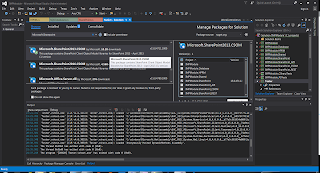
A great co-worker showed our team the following NUGET package that allows you to work directly from your work station instead of needing a full SharePoint 2013 Development Environment and I am sure it would work for SharePoint 2016. See the image below.
Thanks to Joe.
Thanks to Joe.

Friday, December 22, 2017
Merry Christmas to All!
Friday before Christmas 2017, wanted to let all my readers know I wish them a very Merry Christmas and hope Santa brings them there wish list. You must Believe to Receive! Merry Christmas!
C# reminder of the day sealed
When the keyword "sealed" is applied to a class, the sealed modifier prevents other classes from inheriting from it. In the following example, class B inherits from class A, but no class can inherit from class B
Code sample
class A {}
sealed class B : A {}
Source - MSDN
SharePoint 2013 --- I'm Back
Wow, back at developing in SharePoint, who knew...
Well my new co-working SharePoint Kerry, gave me some insight on SharePoint Application Permissions DUH! I an knocking the cobwebs out of my head using SharePoint Again.
Central Admin > Application Management > Select the "App" > On the ribbon User Policy --- *DUH*!
Adding or updating Web application policy with new users or groups will trigger a SharePoint Search crawl over all content covered by that policy. This can reduce search crawl freshness and increase crawl load. Consider using security groups at the policy level and add/remove users from security groups to avoid this.
Thursday, October 26, 2017
AWS - Impressed
Setup a .NET Core Server in < 5 minutes - http://mmwebs-dev.us-east-1.elasticbeanstalk.com/
Try Amazon Music Unlimited 30-Day Free Trial
Try Amazon Music Unlimited 30-Day Free Trial

Monday, July 10, 2017
SQL Server Configuration Manager error: Cannot connect to WMI provider Permission Denied
1. Open CMD as Administrator
2. Change Directory to cd C:\Program Files (x86)\Microsoft SQL Server\110\Shared --- ENTER
3. mofcomp sqlmgmproviderxpsp2up.mof
Try to open SQL Server Configuration Manager ---
CREDIT - https://www.youtube.com/watch?v=SuCUSH0RAVo
Wednesday, June 14, 2017
Perfmon how to resize counter frame at bottom of the window
Workaround:
When Performance Monitor opens, one or more default counters are in the legend pane and only the first is visible. The legend pane is not resizable.
Right click in the legend pane and select Remove All Counters.
Re-add the desired counters and and the legend pane resizes to fit all/most as needed.


Monday, June 05, 2017
JavaScript Refresh Time
There are 7 basic types in JavaScript.
number for numbers of any kind: integer or floating-point.
string for strings. A string may have one more more characters, there’s no separate single-character type.
boolean for true/false.
null for unknown values – a standalone type that has a single value null.
undefined for unassigned values – a standalone type that has a single value undefined.
object for more complex data structures.
symbol for unique identifiers.
The typeof operator allows to see which type is stored in the variable.
Two forms: typeof x or typeof(x).
Returns a string with the name of the type, like "string".
For null returns "object" – that’s the error in the language, it’s not an object in fact.
In the next chapters we’ll concentrate on primitive values and once we’re familiar with that, then we’ll move on to objects.
New great online tool - http://plnkr.co/
Also Must READ!!!!


Tuesday, April 11, 2017
How to catch an error and send via email and log to the server (aka simple text file not event log). (VB.NET)
Catch ex As Exception
'Log to exception table
Dim strError As String
strError = Now().ToString() & "Error: (Class=PromoCode;Method=IsEmailRequired)" &
";" & vbCrLf & "PromoId = " & promoCodeId &
";" & vbCrLf & vbCrLf & "Exception " & ex.ToString()
MiscFunctions.SendExceptionEmail(strError)
MiscFunctions.WriteLogRecord(strError)
myPromoCode = Nothing
Return myPromoCode
End Try
'---------------------------------------------------------------------------
'Description: Email Exception Error
'---------------------------------------------------------------------------
Public Shared Sub SendExceptionEmail(ByVal errorException As String)
Dim myMail As New MailMessage()
myMail.From = New MailAddress("error@domain.com")
myMail.Subject = ConfigurationManager.AppSettings("CoreHTTPPath") & " error exception"
'Create an email from the email addresses in the app.config file
Dim emailTo As String = System.Configuration.ConfigurationManager.AppSettings("AdminEmails").ToString()
Dim strEmailArray() As String
strEmailArray = Split(emailTo, ";")
For Each email As String In strEmailArray
myMail.[To].Add(email)
Next
Dim sb As New StringBuilder()
sb.Append("www.domain.com error exception: " & vbCrLf & vbCrLf)
sb.Append(errorException)
Dim strBody As String = sb.ToString()
myMail.Body = strBody
myMail.IsBodyHtml = False
Dim smtp As New SmtpClient()
Try
smtp.Send(myMail)
myMail = Nothing
Catch ex As System.Exception
WriteLogRecord(Now().ToString() & " Error: (Function Sending errorException) " & ex.ToString)
End Try
End Sub
Public Shared Sub WriteLogRecord(ByVal strErroMsg As String)
Dim objWrite As IO.StreamWriter
Dim strDateTime As String = Now().ToString()
strDateTime = Replace(strDateTime, "/", "-")
strDateTime = Replace(strDateTime, ":", "")
objWrite = IO.File.AppendText(System.Configuration.ConfigurationManager.AppSettings("EmailErrorLogs") & "/EmailErrorLog.log")
objWrite.WriteLine(strErroMsg)
objWrite.Close()
End Sub
'Log to exception table
Dim strError As String
strError = Now().ToString() & "Error: (Class=PromoCode;Method=IsEmailRequired)" &
";" & vbCrLf & "PromoId = " & promoCodeId &
";" & vbCrLf & vbCrLf & "Exception " & ex.ToString()
MiscFunctions.SendExceptionEmail(strError)
MiscFunctions.WriteLogRecord(strError)
myPromoCode = Nothing
Return myPromoCode
End Try
'---------------------------------------------------------------------------
'Description: Email Exception Error
'---------------------------------------------------------------------------
Public Shared Sub SendExceptionEmail(ByVal errorException As String)
Dim myMail As New MailMessage()
myMail.From = New MailAddress("error@domain.com")
myMail.Subject = ConfigurationManager.AppSettings("CoreHTTPPath") & " error exception"
'Create an email from the email addresses in the app.config file
Dim emailTo As String = System.Configuration.ConfigurationManager.AppSettings("AdminEmails").ToString()
Dim strEmailArray() As String
strEmailArray = Split(emailTo, ";")
For Each email As String In strEmailArray
myMail.[To].Add(email)
Next
Dim sb As New StringBuilder()
sb.Append("www.domain.com error exception: " & vbCrLf & vbCrLf)
sb.Append(errorException)
Dim strBody As String = sb.ToString()
myMail.Body = strBody
myMail.IsBodyHtml = False
Dim smtp As New SmtpClient()
Try
smtp.Send(myMail)
myMail = Nothing
Catch ex As System.Exception
WriteLogRecord(Now().ToString() & " Error: (Function Sending errorException) " & ex.ToString)
End Try
End Sub
Public Shared Sub WriteLogRecord(ByVal strErroMsg As String)
Dim objWrite As IO.StreamWriter
Dim strDateTime As String = Now().ToString()
strDateTime = Replace(strDateTime, "/", "-")
strDateTime = Replace(strDateTime, ":", "")
objWrite = IO.File.AppendText(System.Configuration.ConfigurationManager.AppSettings("EmailErrorLogs") & "/EmailErrorLog.log")
objWrite.WriteLine(strErroMsg)
objWrite.Close()
End Sub
Thursday, February 23, 2017
Count Columns in Table in SQL Server
SELECT COUNT(COLUMN_NAME)
FROM INFORMATION_SCHEMA.COLUMNS
WHERE TABLE_CATALOG = 'DbName' AND TABLE_SCHEMA = 'dbo'
AND TABLE_NAME = 'TableName'
FROM INFORMATION_SCHEMA.COLUMNS
WHERE TABLE_CATALOG = 'DbName' AND TABLE_SCHEMA = 'dbo'
AND TABLE_NAME = 'TableName'
Thursday, February 16, 2017
IIS App Pool Recycle Logs
If you need to view information about application pool recycle set a custom view in Windows Event Viewer.
1. Start Search Event Viewer
2. Select Custom Views > Actions: Create Custom View
3. Logged what ever time you need
4. Select all event levels
5. By Source (WAS) Very Important
Click OK.
1. Start Search Event Viewer
2. Select Custom Views > Actions: Create Custom View
3. Logged what ever time you need
4. Select all event levels
5. By Source (WAS) Very Important
Click OK.
Thursday, February 02, 2017
SQL Tips
http://sqlhints.com/2012/05/03/how-to-set-default-database-in-sql-server-mangement-studio-a-time-saving-tip/
Great new site I found above.
Captain SQL Jason also taught this old dawg some new tricks. He told me I am not allowed to share them. They help us Veterans in the field keep our jobs. :)
Great new site I found above.
Captain SQL Jason also taught this old dawg some new tricks. He told me I am not allowed to share them. They help us Veterans in the field keep our jobs. :)
Monday, October 17, 2016
Regular Expressions
To match a string that contains only those characters (or an empty string), try
"^[a-zA-Z0-9_]*$"
This works for .NET regular expressions, and probably a lot of other languages as well.
Breaking it down:
^ : start of string
[ : beginning of character group
a-z : any lowercase letter
A-Z : any uppercase letter
0-9 : any digit
_ : underscore
] : end of character group
* : zero or more of the given characters
$ : end of string
If you don't want to allow empty strings, use + instead of *.
EDIT As others have pointed out, some regex languages have a shorthand form for
[a-zA-Z0-9_]. In the .NET regex language, you can turn on ECMAScript behavior and use \w as a shorthand (yielding ^\w*$ or ^\w+$). Note that in other languages, and by default in .NET, \w is somewhat broader, and will match other sorts of unicode characters as well (thanks to Jan for pointing this out). So if you're really intending to match only those characters, using the explicit (longer) form is probably best.
http://www.analyticsmarket.com/freetools/regex-tester
Thursday, October 13, 2016
Page size calculation formula
Commit charge:
1. Run Performance Monitor (Perfmon)
2. Go to Data Collector Sets\User Defined
3. Right click on User Defined and select New
4. Select Create Manually and next
4. Check Performance counter
5. Add the following counters:
Memory\Committed Bytes – Committed Bytes is the amount of committed virtual
memory, in bytes.
Memory\Committed Limit – Amount of virtual memory that can be committed without
having to extend the paging file
Memory\% Committed Bytes In Use – Ratio of Memory\Committed Bytes to the
Memory\Commit Limit
Make sure you collect the information over a long
period (one week at least), and the server is running at peak usage.
The page file size formula should be:
(Max value of Committed Bytes + additional 20%
buffer to accommodate any workload bursts)-RAM size
For example: If the server has 24 GB RAM and the
maximum of Committed Bytes is 26 GB, then the recommended page file will be:
(26*1.2)-24) = 7.2 GB
Tuesday, September 06, 2016
DBA Secret KeyStroke by Jason "CPT SQL" Miller
ALT+F1 with Object Highlighted in SSMS all you ever wanted to know (aka Table Definition) and if your other developers never teach you this, you should beat them with a stick. I am HAPPY, today is a good day.
Subscribe to:
Posts (Atom)
-
The problem was that the remote connection needed to utilize Named Pipes, but in order to utilize Named Pipes both the machine hosting the i...
-
How to clear SharePoint People Picker suggestion cache If you have been SharePoint Site owner long enough, you would have definitely ...
-
 Getting the following error (Figure 1): Server Error in '/' Application. ID4014: A SecurityTokenHandler is not registered to ...